Free org chart template, from a list
An org chart template
that starts from a list.
Import an indented list of names and roles, or ask ChatGPT or Claude. You get an organizational chart you can edit, one person per topic.
Use it free — no card, no trial →
- Free forever — not a trial
- Up to 10 maps, kept for good
- Every export included
Free has no end date — upgrade only if you outgrow 10 maps. It opens empty, with fields for role, team, location, contact and start date on every person.
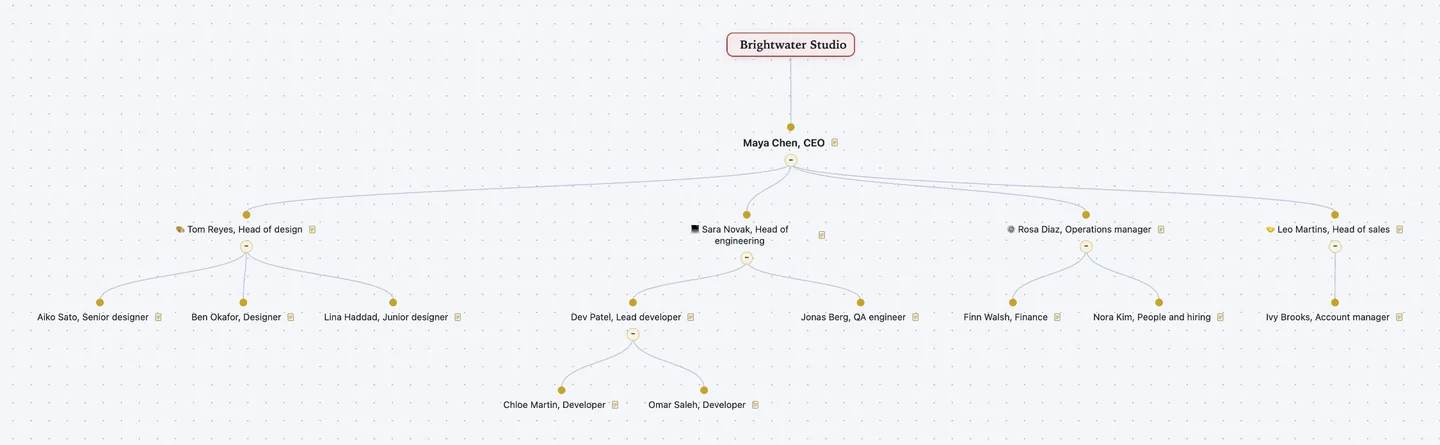
From a list, not a canvas. Write each person under their manager. Import the list, and the chart is drawn for you.
One topic per person. Each person has fields for role, team, location, contact and start date. Add a photo as the topic image.
Edit it like an outline. Drag a person to a new manager, and their team moves too. Export a PDF or PNG for the wiki.
How to make an org chart from a list
An org chart, short for organizational chart, shows who reports to whom. Most org chart makers start you on a blank canvas of boxes and lines. A list is quicker to type. Write each person under their manager, and the structure is already there. Atlas Red reads that list as a tree.
- Start at the top. Put the company or team name at the centre. The leader is the first topic under it.
- Write people under their managers. One line per person: name, then role. Indent each person one level under the person they report to.
- Import the list, or ask an assistant. Save the list as a Markdown or OPML outline and import it. Or give it to ChatGPT or Claude and ask for an org chart in Atlas Red.
- Fill the fields. Each person has role, team, location, contact and a start date. Fill what your readers need. Leave the rest blank.
- Use the vertical layout. The vertical layout draws the chart top to bottom, like a classic org chart. Add photos as topic images if you want faces.
- Draw dotted lines as cross-links. A tree gives each person one manager. If someone also reports to a second lead, draw a cross-link to that lead.
- Keep it current. When someone joins or moves, add or drag their topic. Their team moves with them. Export a fresh PDF for the wiki.
Worked example: a 15-person studio
Brightwater is a made-up design studio of 15 people in Lisbon and Berlin. Each person sits under their manager. Role, team, location and start date are fields. This is the map shown above.
- Maya Chen, CEORole: Chief executive and founder · Team: Leadership · Location: Lisbon · Contact: maya@brightwater.example · Since: 2019-03-01
- 🎨 Tom Reyes, Head of designRole: Head of design · Team: Design · Location: Lisbon · Contact: tom@brightwater.example · Since: 2019-06-03
- Aiko Sato, Senior designerRole: Senior designer · Team: Design · Location: Lisbon · Since: 2021-02-15
- Ben Okafor, DesignerRole: Product designer · Team: Design · Location: Remote, Lagos · Since: 2023-09-04
- Lina Haddad, Junior designerRole: Junior designer · Team: Design · Location: Lisbon · Since: 2025-01-13
- 💻 Sara Novak, Head of engineeringRole: Head of engineering · Team: Engineering · Location: Berlin · Contact: sara@brightwater.example · Since: 2020-01-06
- Dev Patel, Lead developerRole: Lead developer · Team: Engineering · Location: Berlin · Since: 2020-05-11
- Chloe Martin, DeveloperRole: Front-end developer · Team: Engineering · Location: Berlin · Since: 2022-08-01
- Omar Saleh, DeveloperRole: Back-end developer · Team: Engineering · Location: Remote, Cairo · Since: 2024-03-18
- Jonas Berg, QA engineerRole: Quality assurance engineer · Team: Engineering · Location: Berlin · Since: 2023-01-09
- Dev Patel, Lead developerRole: Lead developer · Team: Engineering · Location: Berlin · Since: 2020-05-11
- ⚙️ Rosa Diaz, Operations managerRole: Operations manager · Team: Operations · Location: Lisbon · Contact: rosa@brightwater.example · Since: 2019-09-02
- Finn Walsh, FinanceRole: Finance and invoicing · Team: Operations · Location: Lisbon · Since: 2021-11-01
- Nora Kim, People and hiringRole: People and hiring · Team: Operations · Location: Lisbon · Since: 2022-04-04
- 🤝 Leo Martins, Head of salesRole: Head of sales · Team: Sales · Location: Lisbon · Contact: leo@brightwater.example · Since: 2021-05-03
- Ivy Brooks, Account managerRole: Account manager · Team: Sales · Location: Berlin · Since: 2024-10-07
- 🎨 Tom Reyes, Head of designRole: Head of design · Team: Design · Location: Lisbon · Contact: tom@brightwater.example · Since: 2019-06-03
Look at Dev. He leads two developers and reports to Sara. Drag Dev under Tom, and both developers move with him. Ivy also helps Tom with client pitches. That is a dotted line. In your map it is a cross-link from Ivy to Tom, not a second branch.
Let ChatGPT or Claude draft it
Connect Atlas Red to ChatGPT or Claude once. It is free. Then ask:
Make an org chart in Atlas Red from this list: [names, roles, who reports to whom]. Use the org chart template. Put each person under their manager and fill in role, team, location and start date.
You get the same template, filled in, in your own account. Fix what it got wrong by hand. Or ask for another round.
Questions people ask
How do I make an org chart from a list of names?
Write one line per person, with name and role. Indent each person under their manager. Save it as a Markdown or OPML outline and import it into Atlas Red. Each line becomes a topic in the org chart template's tree. Then fill the fields and switch to the vertical layout.
Can ChatGPT or Claude make an org chart from a list?
Yes. Connect Atlas Red to ChatGPT or Claude and paste your list. It can be messy: a staff table, an email, notes. Ask for an org chart. It builds the tree from this template in your account. Check who reports to whom before you share it.
Can a person have two managers?
Not as a second branch. The chart is a tree, so each person has one manager. Draw a dotted-line report as a cross-link between the two people. If your company runs as a matrix, with many shared reports, a diagram tool may suit you better.
Is this org chart template free?
Yes. It comes with Atlas Red's Free edition. You get up to 10 maps, kept with no end date, and every export. No credit card. Pro is one payment of $99 for unlimited maps.
Can I export the org chart to PowerPoint, Excel or Word?
Not as those files. Every edition exports PDF, PNG, JPEG, SVG, slides, an interactive web page, Markdown, OPML and plain text. Put the PNG or SVG on a PowerPoint slide. For a staff list, export Markdown and paste it into Word or Google Docs. Each field comes along as a "Label: value" line.
Atlas Red or a diagram tool: which org chart maker should I use?
Diagram tools such as Lucidchart give you free shapes, lines and layouts. They suit large charts and matrix teams. Atlas Red builds the organizational chart from a list and keeps it as a tree. It suits small teams who would rather type than draw. Each person keeps their fields, and the chart exports to Markdown and OPML.
Can I add photos to the org chart?
Yes. Set a photo as a person's topic image. It shows on the map and in image exports. Leave it out if the chart goes to people outside the company.