Free bowtie diagram template
A bowtie diagram template
that shows every barrier.
Name the hazard and the moment control is lost. Put the threats on one side, the consequences on the other, and the barriers in between.
Use it free — no card, no trial →
- Free forever — not a trial
- Up to 10 maps, kept for good
- Every export included
Free has no end date — upgrade only if you outgrow 10 maps. Opens with the hazard, the top event, two threats and two consequences, each with a barrier.
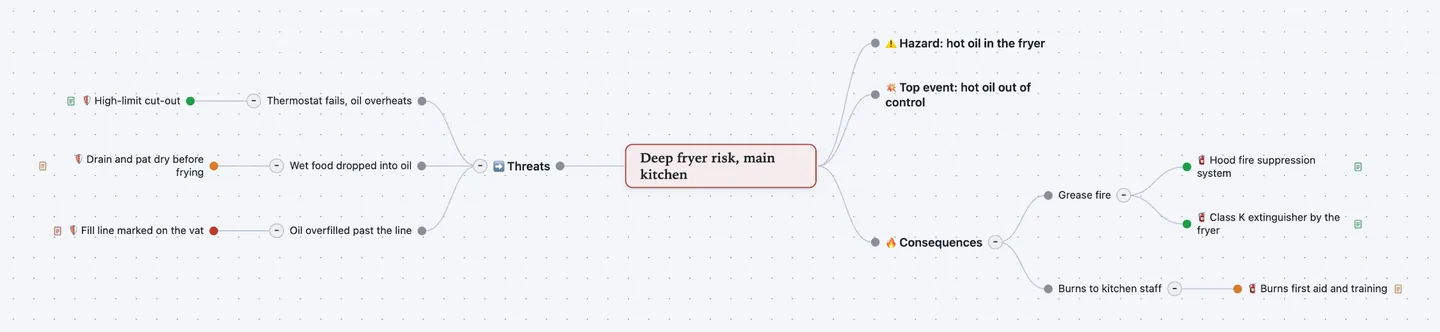
Both sides of the knot. Threats and preventive barriers on the left. Consequences and recovery barriers on the right.
Rate every barrier. Each barrier has an owner, an effectiveness rating and a note on what could make it fail.
Show it at the safety review. Export the bowtie as a PDF, an image or slides. Or share it as a web page.
How to make a bowtie diagram, step by step
A bowtie diagram shows how one risk can happen and what stops it. It grew up in the chemical and oil industries and is now common in aviation, healthcare and food safety. The event sits in the knot. Causes fan out to the left, outcomes to the right.
- Name the hazard. A hazard is something in your work that can cause harm. Hot oil, a ladder, patient data. It is often a normal part of the job.
- Define the top event. The top event is the moment you lose control of the hazard. "Hot oil out of control", not "fire". The fire is a consequence.
- List the threats. Threats are what can cause the top event. Each one gets its own branch on the left.
- Add preventive barriers. Under each threat, list what stops it reaching the top event. Equipment, procedures and training all count.
- List consequences and recovery barriers. Consequences are what happens after the top event. Under each, list what limits the damage.
- Rate barriers and escalation factors. Mark each barrier effective, partly effective or not effective. An escalation factor is a condition that weakens a barrier, such as fatigue or skipped servicing. Note it on the barrier.
Worked example: a restaurant deep fryer
A small restaurant reviews the risk from its deep fryer. The kitchen manager maps how hot oil could get out of control and what stops each path. This is the map shown above.
- ⚠️ Hazard: hot oil in the fryer
- ➡️ Threats
- Thermostat fails, oil overheats
- 🛡️ High-limit cut-outOwner: Chef Ana · Effectiveness: Effective
- Wet food dropped into oil
- 🛡️ Drain and pat dry before fryingEffectiveness: Partly effective · Escalation factor: Rush hour, new staff
- Oil overfilled past the line
- 🛡️ Fill line marked on the vatEffectiveness: Not effective · Escalation factor: Line worn off
- Thermostat fails, oil overheats
- 💥 Top event: hot oil out of control
- 🔥 Consequences
- Grease fire
- 🧯 Hood fire suppression systemOwner: Manager · Effectiveness: Effective · Escalation factor: Six-monthly service missed
- 🧯 Class K extinguisher by the fryerEffectiveness: Effective
- Burns to kitchen staff
- 🧯 Burns first aid and trainingOwner: Manager · Effectiveness: Partly effective
- Grease fire
The weak barrier is plain to see: the fill line has worn off. The fix is cheap. Repaint the line, then rate the barrier again.
Let ChatGPT or Claude draft it
Connect Atlas Red to ChatGPT or Claude once. It is free. Then ask:
Make a bowtie diagram in Atlas Red for this risk: [the hazard and what losing control looks like]. Use the bowtie template, list at least three threats and two consequences, and give each a barrier.
You get the same template, filled in, in your own account. Fix what it got wrong by hand. Or ask for another round.
Questions people ask
What is a bowtie diagram?
A picture of one risk. The top event sits in the middle, where control of a hazard is lost. Threats and preventive barriers fan out to the left. Consequences and recovery barriers fan out to the right. The shape looks like a bow tie.
What goes in a bow tie diagram template?
The hazard, the top event, the threats with their preventive barriers, and the consequences with their recovery barriers. Many teams add escalation factors and a barrier owner. This template has fields for owner, effectiveness and escalation factor.
What is an escalation factor in a bowtie analysis?
A condition that makes a barrier weaker or fail. Fatigue, missed maintenance or a worn label are examples. Some bowties add a second barrier to guard against the escalation factor. Here you note it on the barrier, or add the guard as a child topic.
Is this bowtie diagram template free?
Yes. It is part of Atlas Red's Free edition: up to 10 maps, kept with no end date, every export included, no credit card. Pro is a one-time $99 payment for unlimited maps.
Can I export the bowtie risk assessment to PowerPoint or Excel?
Not as a .pptx or .xlsx file. Every edition exports slides, PDF, PNG, JPEG and SVG images, an interactive web page, Markdown, OPML and plain text. Markdown keeps fields as "Label: value" lines and pastes into Word or Google Docs.
Can ChatGPT or Claude draft a bowtie analysis?
Yes. Connect Atlas Red to ChatGPT or Claude and name the hazard. It builds the map from this template in your workspace. People who know the site still check each barrier.
Bowtie diagram vs fishbone diagram — what is the difference?
A fishbone diagram looks back at one problem that already happened and lists its causes. A bowtie looks ahead at one event that could happen. It shows both its causes and its consequences, and the barriers on each side.